Samsung S6 Flacs

Botjo

Member
May 22, 2015
15
0
0
Hello all.
First post.
I'm trying to drag & drop flac music files to my first Android phone using a USB cable. (Windows Vista).
I keep getting error messages.
Any help would be appreciated.
 
Can you describe what device you have and what file transfer software you are using on your PC?
 
Just to add it works fine with MP3's, pretty much all my music are flag's now.
So I am loathe to convert them to MP3's.

Posted via the Android Central App
 
I have the Samsung Galaxy S6 & I'm just using Windows to drag & drop the flac folders into the Samsung S6 music folder.
I tried KIEYS software & I also have Smartswitch.

Posted via the Android Central App
 
Just to add it works fine with MP3's, pretty much all my music are flag's now.
So I am loathe to convert them to MP3's.

Posted via the Android Central App
If you are moving the music from a PC to your GS6, try installing Smart Switch on the both.
 
I have Smartswitch on both the pc & the S6.
The only options I can see are to transfer from phone to phone?

Posted via the Android Central App
 
I have already done the Googling & associated reading.
I thought I'd be able to drag & drop the files considering it's documented that the S6 supports the flac format.
Without the need to download some software.

Posted via the Android Central App
 
I have already done the Googling & associated reading.
I thought I'd be able to drag & drop the files considering it's documented that the S6 supports the flac format.
Without the need to download some software.

Posted via the Android Central App
What are the file formats? What error message are you getting?
 
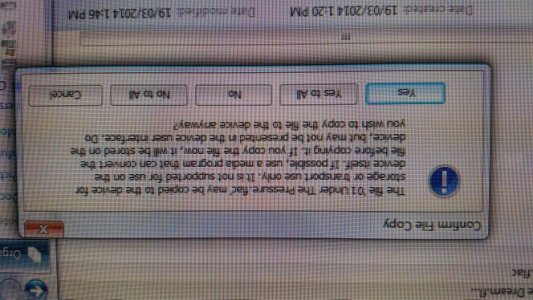
The format is not supported.

Posted via the Android Central App
 

Attachments

  • 19047.jpg
    19047.jpg
    33.6 KB · Views: 27
The format is not supported.

Posted via the Android Central App
Not much of an audiophile or tech expert. It's early. There should be more help coming. Is there software that converts the format without affecting file working properly? The SME who may be able to help need as much information as possible. Sorry I wasn't more help. I know it can be frustrating,when something as simple as drag and drop is involved.
 
FLAC is a universally used lossless audio format.
I would've thought that it's documented that the S6 supports FLAC that it'd be a seamless transfer.
Thanks for your help tho much appreciated.

Posted via the Android Central App
 
I've copied a few folders full of FLAC albums onto my S6 without any problems, never got any errors.

Posted via S6
 
Are you just getting a warning/error message on your PC saying that the file format(s) you are copying over to the phone may not be supported? Or have you actually copied them over and tried to play them on the phone?

I am trying to recall as best I can, but on my S4 I remember copying PNG image files from my pc to my phone, and would get a warning message ... but the phone supported the PNG files just fine. Never could figure out how to suppress the warning, so I just got used to it being there when I went to copy PNG's to my phone.
 
It's an error on the PC, it transfers MP3's fine.
I managed to transfer some flacs with WiFi using some third party software (mobilego) installed on both the pc & the s6.
But I should be able to use the USB & I don't want to be running 3rd party software.
Thanks.

Posted via the Android Central App
 

Attachments

  • 19191.jpg
    19191.jpg
    53.4 KB · Views: 13
It's an error on the PC, it transfers MP3's fine.
I managed to transfer some flacs with WiFi using some third party software (mobilego) installed on both the pc & the s6.
But I should be able to use the USB & I don't want to be running 3rd party software.
Thanks.

Posted via the Android Central App
Sounds like you are making progress.
 

Trending Posts

Forum statistics

Threads
960,318
Messages
6,981,936
Members
3,164,475
Latest member
grastyvirginia200