Screenshot

Hold power and volume down for a second. Pretty much every Android device is that way

However, many cases make this process difficult or even impossible.

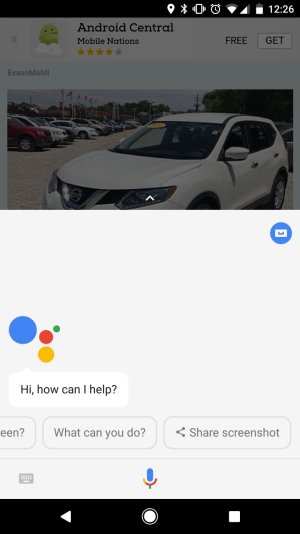
One relatively new way to take a screenshot is to enlist the help of the Google Assistant. Just press the center-bottom button for a few seconds until the assistant pops up and then say, "screenshot" or "take a screenshot" if you are the wordy type. It will capture the screen and then offer a multitude of ways to save or share the image.
 
However, many cases make this process difficult or even impossible.

One relatively new way to take a screenshot is to enlist the help of the Google Assistant. Just press the center-bottom button for a few seconds until the assistant pops up and then say, "screenshot" or "take a screenshot" if you are the wordy type. It will capture the screen and then offer a multitude of ways to save or share the image.

Thanks for the info. My case makes it really hard to get screenshots, never thought of using Assistant. 🤦
 
If you have Ok Google detection on just say screen shot. I underestimate google assistant all the time. Im using it more now than ever though.
 

Latest posts

Trending Posts

Members online

Forum statistics

Threads
960,591
Messages
6,982,943
Members
3,164,544
Latest member
jocar37