Stop calendar notifications as text messages.

sticker12

Active member
Apr 19, 2014
32
0
0
I set many reminders for myself using the stock calendar app but some of the events I created notify as text messages. I'm pretty sure I complete them the same way every time. I want to just receive normal reminders that appear as a snooze button and dismiss and not an actual text message.
 
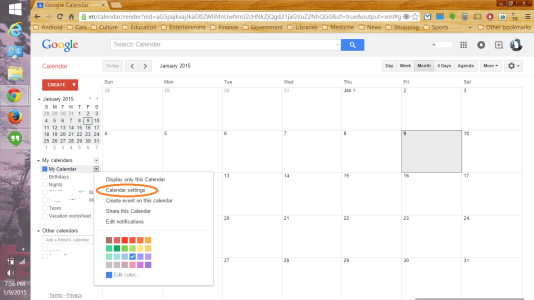
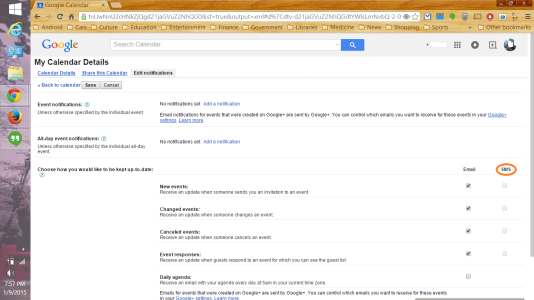
Are the events you're creating syncing with your Google Calendar? If so, try going to Google Calendar on your computer browser, click on the dropdown menu of your main calendar (in the left column), click Calendar Settings, then Edit Notifications. Is SMS checked on for anything there?
 
Couldn't find the path you were indicating. I'm signed into my phone using my gmail account and the calendar app is the preinstalled one the phone came with.
 
This is what I mean, on the Google Calendar website on your computer browser:

Screenshot (2).pngScreenshot (3).png
 
Got it thanks a ton for your help. I unchecked SMS so I'll find out later today if this worked.
 

Trending Posts

Forum statistics

Threads
963,022
Messages
6,992,471
Members
3,164,967
Latest member
uOttawaGrad_22