
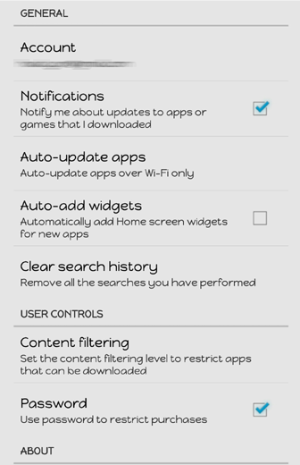
I have two Samsung devices using Jelly Bean (Galaxy S4 phone & Galaxy Tab 3). I'd like control over which applications update automatically and even control over whether I get notifications about updates. One day I got a message that there were a dozen updates. Then I got a message that I was trying to install an alien operating system. (Or something like that. I was on the run at that moment.)
Anyway, between these two devices, there are a lot of apps I don't use and probably never will. Can someone point me in the direction I need to go to simplify and minimize all this? I'm willing to allow updates to the operating system to happen automatically, but I'd like a say over all the rest.
Thanks.
Anyway, between these two devices, there are a lot of apps I don't use and probably never will. Can someone point me in the direction I need to go to simplify and minimize all this? I'm willing to allow updates to the operating system to happen automatically, but I'd like a say over all the rest.
Thanks.



 Facebook
 Twitter
 Instagram