They're in system folders, which you can't see. But if you want to add ringtones, just create a folder named Ringtones (case counts) and put them in there. (Then restart the phone, so the fact that they're there gets picked up.)
Thanks for your help. I was just used to connecting usb (downloading drivers) to access the HTC phone files I've had in the past. Info in system folders seems like a way to keep you from manipulating data in the files. So you're saying there is no way to access the files?
Thanks for your help. I was just used to connecting usb (downloading drivers) to access the HTC phone files I've had in the past. Info in system folders seems like a way to keep you from manipulating data in the files. So you're saying there is no way to access the files?
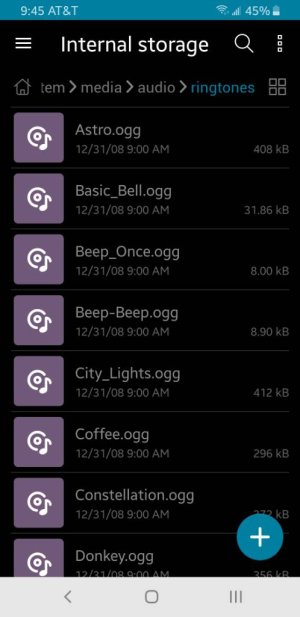
Not from a PC, but some file manager apps will let you browse to the root folder, then into the system folders. I use Asus file manager, and it let's you back up to the root directory. In the app, you have to turn off "hide system files".
From there you can find root/system/media/audio/ringtones/
ES File manager can do this too.
You can copy all you want to a regular folder, then drag and drop on a PC that can see that folder.



 Facebook
 Twitter
 Instagram