Why does MMS say download failed? Galaxy S8+

aesponda

New member
Sep 20, 2017
3
0
0
Hello everyone,

I have an ongoing issue with receiving pictures and videos on my S8+. At first, I was having problems with receiving certain MMS messages because they wouldn't download at all. Now, they are all downloading but there is a duplicate image that either says "failed" or "sender canceled". I have checked with the senders and all say they only sent me the image/video once and never canceled it. Has anyone else had this problem and have a solution?
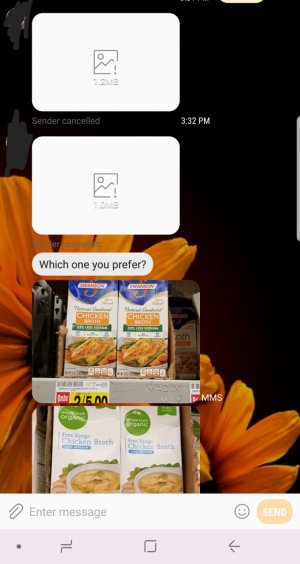
 

Attachments

  • 20170920_153507.jpg
    20170920_153507.jpg
    175.7 KB · Views: 41
Welcome to Android Central! If you didn't get the phone directly from your carrier, check the APN settings to make sure they're correct for your carrier.
 
I have T-Mobile and I used the stock messaging app. I tried switching to Textra for a day but my pictures weren't coming in at all so I went back to messages.
 
I have this exact same problem. I have T-Mobile service & a note 8 that was purchased from the carrier. I did not receive MMS at first, but now I get duplicates & the first one always says failed or sender cancelled. Has anyone discovered a solution yet? Changing the APN did not help.
 
I had this problem as soon as I updated my Samsung Galaxy S8 (GS8) to the Android Oreo operating system.

I tried a whole bunch of suggestions and I did these 3 easy things which fixed it for me:

#1 - Enabled auto-download
Step 1: Open android Messaging app in your Oreo devices
Step 2: Tap on three vertical dots at top right corner
Step 3: Select Settings
Step 4: Tap on Advanced
Step 5: Enable auto-download MMS if disable
(mine was enabled, but this is important to check)

-then-

#2 - Clear cache and data for mms services
Step 1: Go to settings in your Oreo devices
Step 2: Tap on apps & notifications
Step 3: Choose "All Apps" from drop down menu
Step 4: Tap on menu (3 dots) in top right corner
Step 5: Tap on show system apps
Step 6: Find "MmsService" and tap on it
Step 7: Tap on storage
Step 8: Tap on "clear cache" and then after that "clear data" (you don't lose any messages)

-then-

#3 - Restart phone


Hope that works for you as well as it did for me!
 
^ This post ^

I have have been battling with and frustrated by this identical issue since upgrading to Oreo a few weeks ago. Countless Google searches and posts from numerous Sprint and Android forums got me nowhere until yesterday, when I finally found this post. Problem solved, thank you so much for sharing your solution.
 

Latest posts

Trending Posts

Members online

Forum statistics

Threads
963,023
Messages
6,992,476
Members
3,164,967
Latest member
uOttawaGrad_22
