This is odd. There's nothing I can think of that would cause a charger to do this but let's see if we can work through this.
When you say that the screen doesn't timeout and stays on, does it stay on the home screen or does it stay on the lock screen? If you opened it to the home screen would it just stay there until you locked it?
It goes to sleep when plugged into other outlets, using the same cord or different cords too?
If you put the screen to sleep will it stay off or turn back on? How long does it take to turn back on, or is it triggered by an event, like a notification?
Your sleep time is 5 minutes but what is your lock time? Sleep turns off the display, lock means it needs a PIN fingerprint or someone else to access the phone. Putting the screen to sleep doesn't necessarily lock the phone if you have the screen lock set to anything but instant.
Have you tried anything to see if you can force the screen to stay off? Lowered the timeout timer, lowered the lockout timer, pressed the power button to manually put the screen to sleep, closed all the background apps?
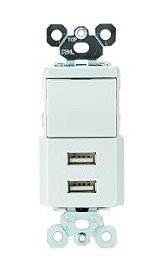
Since this only happens when you use this outlet it makes testing easier because we can reproduce the condition at will. The first test is like to do would be to put the phone in safe mode and see if it continues to act the same. This should help us determine if the issue is related to a bad app installed on your phone or some kind of system or hardware issue. At the moment the only thing that I can image this being would be the outlet is wired incorrectly. Outlets are pretty simple they usually take 2 wires and a ground and it could be as simple as the ground not being connected well, but it could also be one of the legs is wired incorrectly in the USB. I assume but must ask, have you tried both of the USB outlets on this device?
Turn down your screen and lock timeouts (temporarily). What's the result?
Tried and safe mode. What's the result?
Answer our questions and we'll see.
1. When you say that the screen doesn't timeout and stays on, does it stay on the home screen or does it stay on the lock screen? If you opened it to the home screen would it just stay there until you locked it?
a. This is wife's phone. She does not have lock enabled. It stays on the home screen.
2. It goes to sleep when plugged into other outlets, using the same cord or different cords too?
a. I tried two different cords in both working and non-working outlet. Neither cord worked in the problem outlet and both worked in the older outlet.
3. If you put the screen to sleep will it stay off or turn back on? How long does it take to turn back on, or is it triggered by an event, like a notification?
a. If I press the power button to sleep, the screens turns off. When I plug it in, the screen turns on and there is a 'ding' sound. After several seconds, it does go to sleep.
4. Your sleep time is 5 minutes but what is your lock time? Sleep turns off the display, lock means it needs a PIN fingerprint or someone else to access the phone. Putting the screen to sleep doesn't necessarily lock the phone if you have the screen lock set to anything but instant.
a. Wife set it to not lock
5. Have you tried anything to see if you can force the screen to stay off? Lowered the timeout timer, lowered the lockout timer, pressed the power button to manually put the screen to sleep, closed all the background apps?
a. have not tried anything
6. Since this only happens when you use this outlet it makes testing easier because we can reproduce the condition at will. The first test is like to do would be to put the phone in safe mode and see if it continues to act the same.
a. have not tried save mode.
7. This should help us determine if the issue is related to a bad app installed on your phone or some kind of system or hardware issue.
a. I suspect it has to do with 'charging rapidly' capability on the phone.
8. At the moment the only thing that I can image this being would be the outlet is wired incorrectly. Outlets are pretty simple they usually take 2 wires and a ground and it could be as simple as the ground not being connected well, but it could also be one of the legs is wired incorrectly in the USB.
a. Since it works correctly on my old phone, I do not think it is wiring problem.
9. I assume but must ask, have you tried both of the USB outlets on this device?
a. I tried both outlets. The results are the same.
10. Turn down your screen and lock timeouts (temporarily). What's the result?
a. have not tried
11. Tried and safe mode. What's the result?
a. have not tried
12. second phone?
a. I tried my phone, which has lock screen enabled, does sleep after timeout.
b. It is 1 year older Motorola, Moto G Power with Android Version 12. (the problem phone has V14)





 Facebook
 Twitter
 Instagram