How to turn off alarm gradual volume increase with 9.0 pie?

  • Thread starter Thread starter Android Central Question
  • Start date Start date
A

Android Central Question

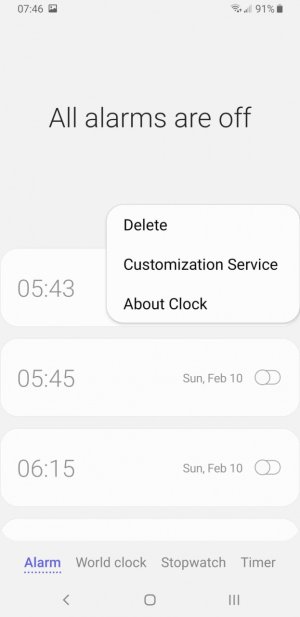
Ever since I updated to 9.0 pie a couple of days ago my alarm has been gradually increasing volume and there is no settings menu when I click the three dots to change it. I have to have a loud alarm suddenly to wake up not this gradual stuff.
 
So you don't get this same menu? Have you tried with the alarm tab selected? What device? What clock or alarm app are you using?

2891f3c5c47705dc2ac2c425ec1cff88.jpg
3fa74dec355b7b73953a6b056374c0ab.jpg
 
No, I have a Samsung Galaxy S9+ I use the "clock" that came with the phone I do not like downloading apps and I was able to disable the gradual increase before I updated to 9.0 pie. I am also having a TON of other issues with pie and I despise it.
 

Attachments

  • clock.jpg
    clock.jpg
    92.8 KB · Views: 45
Welcome to the forums. I moved your thread to the S9 & S9+ forum for better visibility.
 
The Google clock offers the gradual setting. You can set an alarm in Google clock and have the gradual alert set to never and it still will do the gradual sound increase. This is a Samsung issue and without messing with developer mode there is no way to set Google clock as default, the Samsung Clock owns it and the volume is only controlled through that app.

I agree with some other rumbles, Samsung did not do a good job with releasing Pie and the Samsung experience at the same time. The alarm issue was never an issue in Oreo.
 
Last edited:
Ever since I updated to 9.0 pie a couple of days ago my alarm has been gradually increasing volume and there is no settings menu when I click the three dots to change it. I have to have a loud alarm suddenly to wake up not this gradual stuff.

I opened my alarm on android 8.1.0, set the time for my alarm, no where to set volume. While on that time set page, counter-intuitively, I hit the physical volume buttons. Which opened the previously invisible volume setting menu for alarms! As for increasing/decreasing during the alarm, don't know. But this will give you some control over volume intensity....
 
For fun i bought a Moto 7 power, setup Uber driver and boom alarm sound works as it should. It's a Samsung issue with their experience/oneui 10 that forces you to use Samsung clock where alarm is controlled. If you could use stock Android clock as default (you can't as default) it should work but we are forced to use Samsung clock.
 
The Google clock offers the gradual setting. You can set an alarm in Google clock and have the gradual alert set to never and it still will do the gradual sound increase. This is a Samsung issue and without messing with developer mode there is no way to set Google clock as default, the Samsung Clock owns it and the volume is only controlled through that app.

I agree with some other rumbles, Samsung did not do a good job with releasing Pie and the Samsung experience at the same time. The alarm issue was never an issue in Oreo.

I contacted Samsung and confirmed the gradual volume increase feature has been removed. Bit they said they will contact developers about it.

My problem now is not being able to show the Google clock notifications on my Samsung smartwatches. If any has a suggestion I would be grateful.

FYI. Already check notification permissions in app and Galaxy Wearable applications.
 
I contacted Samsung and confirmed the gradual volume increase feature has been removed. Bit they said they will contact developers about it.

Guess I'm in the minority. I actually liked the gradual increase feature and was disappointed that Samsung took it away with the Pie update.
 

Trending Posts

Members online

Forum statistics

Threads
963,130
Messages
6,992,729
Members
3,164,982
Latest member
xatvet7788