lost private photos with system wipe

kwesty

Member
Feb 19, 2015
8
0
0
So I updated to lollipop...tried everything to fix issues, finally gave up and did a factory reset.
I pulled out the sd card first, just in case. Now that everything is back and running...I realized that the private photos (which I had moved to sd card) are missing. I've Googled around, no luck finding them. Even when I plug into a PC I don't see them. anyone had/solved this??
thanks in advance
 
Are you certain the files were moved to the SD Card? If not, I'm afraid they're all but gone. A factory reset wipes out ALL of the internal memory, including pictures, documents, etc.
 
99%...although I am starting to doubt myself now. But I always move files to the SD card, and remember doing so on at a minimum SOME of the files/folders. I see a lot of other people with the same issue, but clicking "show hidden files" in My Files has not worked for me. how tragic.
 
Oh, these were hidden files!
OK...
So, in your SD card, if you take 'out' the files you can see, does it look like the card still has your pictures saved to it? For instance, if your card shows that it has 4GB worth of files, but the ones you can see only add up to 3GB, that means 1GB are potentially hidden files. Is this correct? Or you just don't see the files at all?
 
Hmmm... 0.7GB worth of files is a lot. Does it show as 0.7GB USED space on the SD card or just 'not reported'? Remember that 32GB, for instance, is not really 32GB, it's a bit less... the larger the card, the bigger the chunk that seems to be 'missing'.
 
.7GB was just the difference. (ex. 3.8 total vs 3.1 of what I could see). It could be them though...as there were over 500 photos. (only one or 2 were private..I'm not that lucky in life...I just kept all in the same folder for organization)

After more thinking...they HAD to be on the card. I pulled the card first, and checked under my files, which said 0.0 for photos, before I wiped.

Thinking maybe if I put the card directly to a computer, rather then through the phone, maybe I can find them.
 
It's worth a shot. In the meantime, let me see if one of my buddies knows of a way to see these hidden files, at least list them to see if they are your pictures.
 
I have had the same issues, I have 5.7 GB of files x-file explorer attributes to my private folder on my sd card but it is unable to view any contents, even if I go in private mode or hook up to a computer. I had to send my s5 in for an exchange and the new one must encrypt the "private" media differently. Any help in how to decrypt the files would be greatly appreciated!
 
I never did get mine back either. It's like a Shakespeare tragedy. Un-private if you're thinking s6 People!
 
i know this doesnt help but always make 2 backups of important files, especially treasured pics on an SD card! Save them to a PC as well and/or the cloud.
 
Daveytree, yes, I agree. But I actually went to "my files" and moved the folder back to the card. That's the surprise part.
 
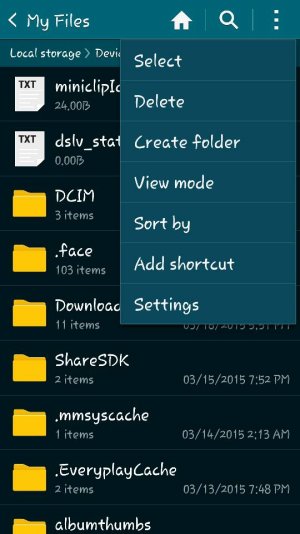
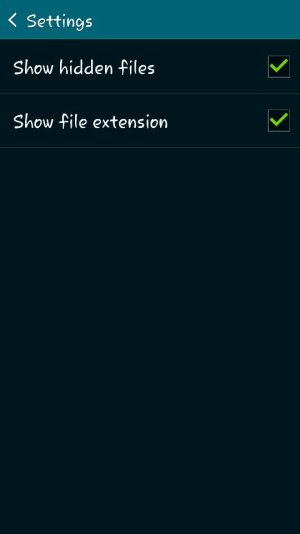
Its worth a shot check both these boxes then check your sdcard 4 the pics. Thought I lost mines a couple times this solved it.


And personally I dont use private mode move the pics to sd card. Add a period to the beginning of the the file name. Using the rename option. The file will dissapear. Use the settings in the pictures above uncheck them. Pictures will dissapear from gallery. Reverse steps. (Dont 4get to remove period pics will again be visible) hope this helps...

Posted via the Android Central App
 

Attachments

  • Screenshot_2015-03-17-13-09-48.jpg
    Screenshot_2015-03-17-13-09-48.jpg
    59.3 KB · Views: 16
  • Screenshot_2015-03-17-13-10-00.jpg
    Screenshot_2015-03-17-13-10-00.jpg
    19.3 KB · Views: 15
I blame Google. Quick pic let's you exclude folders of stuff. But since kk doesn't let you edit sd card I started to use stock gallery.. But it's full of album art and downloaded videos I don't want to see clogging up my photos.. So I put them in private mode as suggested by forum users. Unrelated to this issue I did a factory reset with the sd card out.. Now all those pics are gone..

Thanks a lot kitkat

Posted via the Android Central App