sign in request

Redxjak

Member
Sep 18, 2015
6
0
0
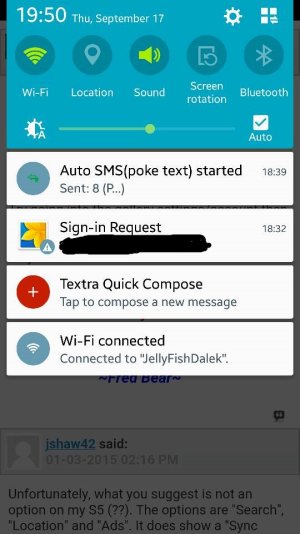
I added my school email to my Gmail app and so of course it wants to sign in to everything else, well for a while now it has given me a sign in request notification and usually I just swipe it away. Well this time it has decided it wants to be up there and not be able to swipe away. I was wondering if anyone knows how to make it stop asking. I have a Samsung galaxy s5 with the most recent att updates

Posted via the Android Central App
 

Attachments
  • Screenshot_2015-09-17-19-50-09.jpg
    Screenshot_2015-09-17-19-50-09.jpg
    108.1 KB · Views: 4
Last edited by a moderator:
Welcome to Android Central! For your safety and privacy, I suggest replacing your posted image with one that censors your email address. FYI, a Moderator might delete your image.

What happens if you just tap that notification?
 
If I tap on it, it just goes to the screen where I approve the sign in to the gallery, and then I just hit cancel

Welcome to Android Central! For your safety and privacy, I suggest replacing your posted image with one that censors your email address. FYI, a Moderator might delete your image.

What happens if you just tap that notification?
 
Go into Settings > Accounts, tap the one for your school account (sounds like it may be a Google Apps account so it'll be under the Google header) then uncheck the boxes (or slide the sliders) for the services you don't want to sync.
 
Iv done that too, everything except email. Only way I have found to remove the notification is to remove the email from my device, which is counter productive
 
If the Samsung account is only linking with your personal Google account, I don't think they'll sync to your school Google account.
 

Trending Posts

Members online

Forum statistics

Threads
961,309
Messages
6,985,744
Members
3,164,696
Latest member
samirez67
