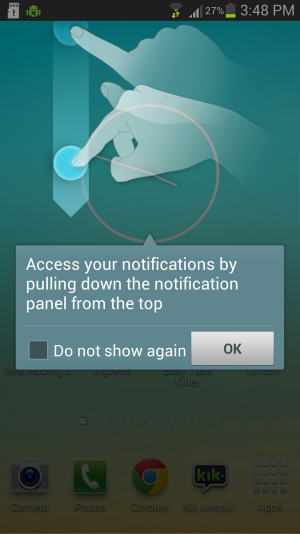
M Matt Johnson1 New member Dec 1, 2012 3 0 0 Jul 12, 2013 #1 Can someone please tell me how to turn these off. It's destroying my life. Attachments 2013-07-12-15-48-40.png 816.3 KB · Views: 25
LadiJae Well-known member May 30, 2010 392 20 18 Jul 12, 2013 #2 Ummmm you mean you don't see that sentence at the bottom with a check box that says do not show again. Check the box and hit ok! ~Jae, tap'n on my Sexy White Galaxy Note 2~
Ummmm you mean you don't see that sentence at the bottom with a check box that says do not show again. Check the box and hit ok! ~Jae, tap'n on my Sexy White Galaxy Note 2~
M Matt Johnson1 New member Dec 1, 2012 3 0 0 Jul 12, 2013 #3 Ha yeah I saw that. Unchecking the box does nothing it comes back everytime.
bespinct Well-known member Apr 24, 2010 832 18 0 Jul 12, 2013 #4 Matt Johnson1 said: Ha yeah I saw that. Unchecking the box does nothing it comes back everytime. Click to expand... Leave it checked.
Matt Johnson1 said: Ha yeah I saw that. Unchecking the box does nothing it comes back everytime. Click to expand... Leave it checked.
S Somdk Well-known member Jun 16, 2013 184 0 0 Jul 12, 2013 #5 bespinct said: Leave it checked. Click to expand... And hit OK.
M Matt Johnson1 New member Dec 1, 2012 3 0 0 Jul 12, 2013 #6 Checked or Unchecked makes no difference. It comes back.
S Somdk Well-known member Jun 16, 2013 184 0 0 Jul 12, 2013 #7 Matt Johnson1 said: Checked or Unchecked makes no difference. It comes back. Click to expand... For me Checking the box and hitting OK did the work. Didnt get these msgs again. Neither in the main menu or in Contacts. Sorry bro couldnt help you.
Matt Johnson1 said: Checked or Unchecked makes no difference. It comes back. Click to expand... For me Checking the box and hitting OK did the work. Didnt get these msgs again. Neither in the main menu or in Contacts. Sorry bro couldnt help you.




 Facebook
 Twitter
 Instagram