Sudden "Fake Notifications" Message

js10

Well-known member
Aug 8, 2018
159
5
18
The subject line pretty much says it all. All of the sudden, on an OLD Moto G that I use for specific purposes (I've gone into detail on this in other threads of mine, but won't do so now unless necessary), an alert noise frequently goes off and then, when I swipe down, I get a long list of notifications with that same message -- "Fake Notifications" and then "do you want to block them" followed by "1215nbryb.com," whatever that is. Anyone here know how to remove this annoyance? Thank you.
 
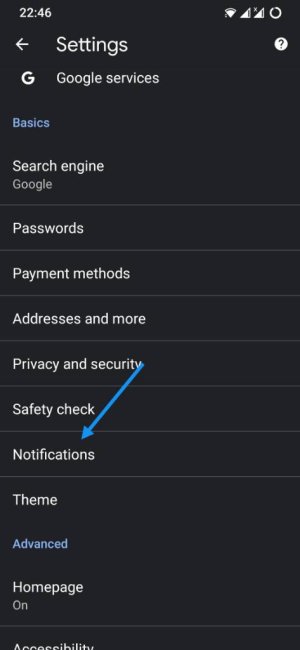
It's possible those notifications come from Chrome or any other browser. Just in case, open Chrome, three dots top right, settings, notifications and make sure it's switched off.
 
It's possible those notifications come from Chrome or any other browser. Just in case, open Chrome, three dots top right, settings, notifications and make sure it's switched off.

Hmm, I actually don't see a notifications option under Settings. Could it be hidden within one of the other menu options?
 
Okay, the plot thickens. On the right of that notification bar there is a little i, and when I tapped it, I got to the app Notifications page. It gave me the option to turn off Chrome notifications altogether, but I don't necessarily want to do this. But then when I tap on the wheel icon, I get a page that says Blocked 258, Allowed 5, and, sure enough, those nbryb.com sites are there! But now what I don't understand is how to delete them. When I tap on them, all I get is a blank Site settings page. So, making progress here, but any more thoughts on this specifically? Thanks again.
 
Okay, the plot thickens. On the right of that notification bar there is a little i, and when I tapped it, I got to the app Notifications page. It gave me the option to turn off Chrome notifications altogether, but I don't necessarily want to do this. But then when I tap on the wheel icon, I get a page that says Blocked 258, Allowed 5, and, sure enough, those nbryb.com sites are there! But now what I don't understand is how to delete them. When I tap on them, all I get is a blank Site settings page. So, making progress here, but any more thoughts on this specifically? Thanks again.
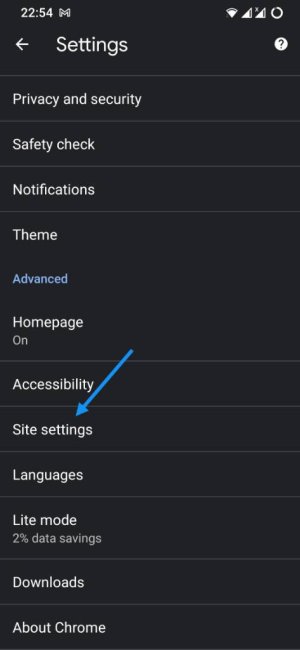
Being an old Moto G it's possible that your Chrome version is outdated and the settings are different. What about under Site settings?

Screenshot_20210801-225452.jpg
 
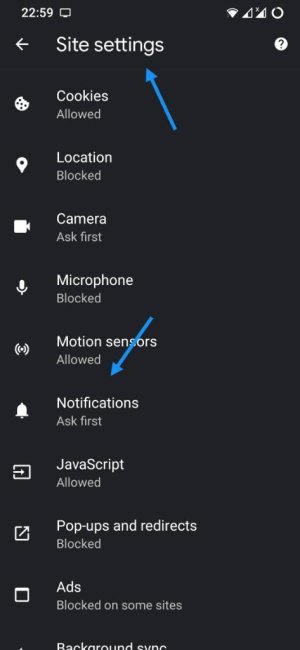
Yes, I'm able to follow that, and it gets me exactly to that page I referenced above in which it tells me which sites are blocked and which are allowed. Now what I need to do is get those sites from the Allowed list to the Blocked list.
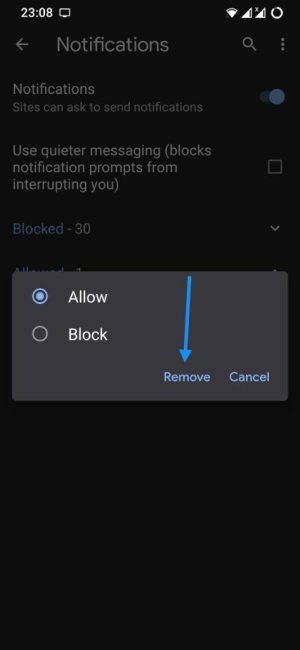
Do you get this window if you tap any of those pages? If so, select Remove.

Screenshot_20210801-230858.jpg
 
Okay, here's what's strange. I was about to write that no, it's just a blank page. But then I glanced back at my screen, suddenly, yes, a page with those two options does, in fact, appear. So, assuming my phone actually listens to this request, I guess we can mark this one as "solved." Thanks, Javier!
 
Last edited: