Trouble with version 6.0.1

Akram1

New member
Jun 22, 2016
1
0
0
Serious trouble with vesion 6.0.1 on samsung galaxy tab s2
On galaxy SM-T815 since this version was installed the guest profile is accessible with no restriction i could not delete it or put a finger print or even an acess code that means if the tablet is stolen it can be used
 
I got the same concern after the Marshmallow update which finally allows multiple accounts, but I noticed that a guest user can't do much. Only emergency calls, can't see contacts, apps are not there, can't see emails, sms etc.
However, unfortunately a guest user can see all files including those on the memory card, like photos etc.
Pretty stupid that a guest user account can't be deleted (like on my Mac).
 
Guys, the odd thing is that gives you an option in Lollipop to delete the guest user but it don't work ...just do the following.

Use the pull down menu at top of home screen. Tap the Guest icon to switch to the Guest user.
When you're in the Guest user mode, use the pull down menu again and you'll notice that the Guest icon now says ' Delete Guest'

When you delete guest, it defaults to you as the user.

Unfortunately, when you go back to check, the user icon is still there. How crazy is that.

Posted via the Android Central App
 
Last edited:
Guys, you can delete the guest user in Lollipop. ...just do the following.

Use the pull down menu at top of home screen. Tap the Guest icon to switch to the Guest user.
When you're in the Guest user mode, use the pull down menu again and you'll notice that the Guest icon now says ' Delete Guest'

When you delete guest, it defaults to you as the user.

I don't have Marshmellow, so I don't know if this works in that version

Posted via the Android Central App
This does not work..the guest account is still accessible. .....
 
Oh crap....you're right. What was the point of giving us that option.😊 Does it work in the Marshmellow version?

Posted via the Android Central App
Nope, there is no fix for this.....yet...I sent them a complaint about at least allowing us to remove this feature....
 
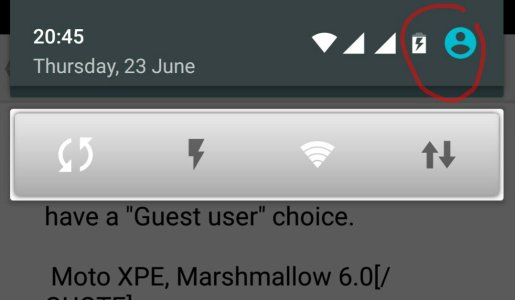
Uh, when I do the pull down menu I don't have a "Guest user" choice.

Moto XPE, Marshmallow 6.0

There should be an avatar top right when you swipe down from the status bar. Another way to access this option is through settings -users.

If you don't get that avatar maybe you'll need to set up your profile in the Contacts app.
 

Attachments

  • 1466725654675.jpg
    1466725654675.jpg
    55.6 KB · Views: 48
Could this have anything to do with the phone being rooted? Are you able to check if the guest is rooted? I ran into this many years ago on a Linux build.
 
Okay, on the locked screen when I tap on my ugly face in the upper right corner and......HOLY CRAP! there's an Add User option. Wow.

Samsung Tab S2, Lollipop 5.1.1

(FWIW, the option to add user does not show when I try this on my Moto XPE 6.0)
 
Have you tried setting up your profile on Contacts?

Yes, but what I was trying to explain is that from the locked screen (before putting in a password) there is NO option to add a guest user on my Moto MPE. On the Tab S2, THERE IS!
 
FYI You can password protect the guest account.

Posted via the Android Central App

True, but there is still the option: Add user that requires no password.

My Moto XPE requires a password before a new user can be set up but not so on the S2.
 
True. But to add a user you have to be logged in to an administrator account. The guest account can't add an account. If you set up an account as administrator, you have to set a password or PIN just like you would on your account.

To be honest, password protecting the guest account is a work around and doesn't solve the problem of being unable to delete or disable it.

Posted via the Android Central App
 
True. But to add a user you have to be logged in to an administrator account.

Nooo, you don't. On the locked screen all I have to do is tap on my icon (upper right hand corner) and I get a drop down showing:

-Me
-New user
-Add user

Tapping on Add user gets you in without any password at all.
 
Ooooohhhh!!! I just did what you said and it allowed me to add an account from the lock screen without asking for my password or fingerprint. Bad juju.

Posted via the Android Central App
 
Last edited:
Even if you password protected the guest account, and the locking the screen with that account, it still allows you to add an account like you said.

Edit: Oh and this also a problem in Lollipop as well. I'm still on Lollipop. Samsung hasn't updated the Tab S2 Nook...at least not yet.

Posted via the Android Central App
 
Last edited:
Is this a Samsung issue or a Goggle/Android issue? After all, the delete guest user option is available, but it just doesn't work.

Posted via the Android Central App
 

Trending Posts

Forum statistics

Threads
962,817
Messages
6,991,904
Members
3,164,927
Latest member
partugyan