
- Sep 29, 2015
- 4
- 0
- 0
I switched carrier networks from Verizon to AT&T, popped my new AT&T SIM card into my SM-G900V Galaxy 5s that I had previously used on the Verizon network. I am able to send/receive regular texts and calls. But cannot send or receive pictures or MMS messages. Not sure if I didnt correctly put the AT&T network information. I keep seeing threads about rooting , whatever that means but I'm totally confused on what that even means or does. When I power it on from the off position it still brings up the Verizon logo while loading, can I change that to AT&T? How about get rid of the stock bull**it apps verizon put on here
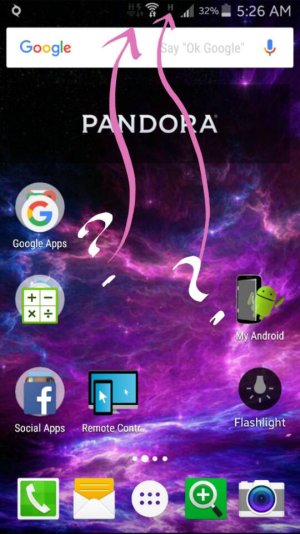
 ? They're all useless considering I'm now using AT&T SIM, but on a Verizon phone. Any info would be greatly appreciated! When I first powered my galaxy on it showed 4G for my Internet, but now all of a sudden after 2 days it shows this H icon
  . I do get the Internet with and without wifi being on. What am I doing WRONG?? Thanks for reading, hope someone had a solution to my issues. Thanks in advance!! ✌✌
Posted via the Android Central App
, whatever that means but I'm totally confused on what that even means or does. When I power it on from the off position it still brings up the Verizon logo while loading, can I change that to AT&T? How about get rid of the stock bull**it apps verizon put on here? They're all useless considering I'm now using AT&T SIM, but on a Verizon phone. Any info would be greatly appreciated! When I first powered my galaxy on it showed 4G for my Internet, but now all of a sudden after 2 days it shows this H icon . I do get the Internet with and without wifi being on. What am I doing WRONG?? Thanks for reading, hope someone had a solution to my issues. Thanks in advance!! ✌✌Posted via the Android Central App



 Facebook
 Twitter
 Instagram