Welcome to Android Central forums. A few questions to start to help us offer the best advice.
It sounds like a bug or glitch and it sounds like it started recently. Did this use to work with no issues? How long ago did this change?
As mustang7757 asked which phone do you have? After a search, I'm guessing S25U?
Can you remember any updates around the time that this started?
Did you install any new apps around the time that this started?
Given that you get results from restarting, we'll assume there is nothing wrong with the case, but for clarity, when this starts you can open and close the case as many times as you want and this condition never changes, correct? Have you tested to see if there is a number of times the case can be opened and closed before it returns to normal? It may not but if you can open and close it a hundred times and it remains, but then goes away instantly with a restart, that would point to software, vs hardware or something else.
Without answers to our questions it will be difficult to be more specific but I will assume you have the S25U based on the information shown and given. It sounds to me like a bug from an update, either to the app used to create this appearance or to the device. Let's start with the easiest and work our way to more in-depth actions.
Let's clear the cache and data for smart view. Navigate to Settings>Apps>at the top of the list use the sort icon to open the pop-up menu>tap the toggle to show system apps and press OK to return to the list>scroll down to or use the search feature to look for Smart View>Storage>Clear cache/Clear data. Did the issue clear up with these actions? If so, test to see how long it lasts. If you're lucky this will take care of it.
If that is not the solution it could be a system bug. For that let's clear the Partition cache. Power off the device>hold the volume up + power button>release the power button when the Samsung splash screen appears>release the volume button when the phone has fully booted>use the volume buttons to navigate the menu and select Wipe Partition Cache with the power button>when complete select Reboot and allow the phone to reboot normally. Obviously, this is a restart which you've established corrects the issue for brief periods so this will be more of an endurance trial.
Let us know what you find, give us some answers and we'll offer more advice.

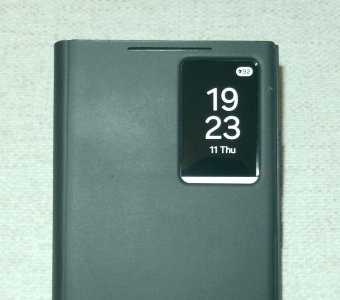


 It's Galaxy S24 Ultra.


 Why do people seem to match the color of the case with the color of the phone?
 Facebook
 Twitter
 Instagram