Battery life is bad

SparklyPickle

Active member
May 31, 2017
38
0
0
For an unknown reason, I have a very mediocre battery life. My phone was at 100% before work, I barely touched it during my shift nor at home due to lack of time and my battery is down to 60%. I did a bit of Facebook, Twitter and a couple of text messages. I have my location set to battery saving, my NFC and Bluetooth are off. However, I'm always on mobile network. Would that be a battedy hog?
 
Hi there,

How is your signal strength? You could indeed have poor battery life if the phone is searching for a signal where one is weak.
 
I also noticed battery life issues (separate post with all my issues (https://forums.androidcentral.com/s...now-since-upgrading-nougat-3.html#post5829678). Many other posts recommend the GSam Battery Monitor from the Play Store. It gives better information than the built in battery monitor (temperature, phone signal are some of the data provided). You might install that, at least temporarily, to see if you can learn anything. You need to connect your phone to computer via USB and do a bit of work to get at the detailed app analysis, but it wasn't hard to do. The app will walk you through those steps. You can see the difference in information provided. My more recent posts were from GSam.
 
You had good battery life at some point in time? What changed? Was there a software update? New app?

I've got US Cellular looking into possible tower issues. Phone was good for 4 1/2 months (on marshmallow). Mid April started getting hot and having random issues with battery life. Week later got nougat update. Issues continued, even after cache wipe and factory reset. Eventually had them send me a refurb phone. Still had battery issues initially but not the high temperatures. After a factory reset and individually installing apps, seems to have settled in. But still seeing phone go into roam mode sporadically. So hopefully US Cellular finds something.
 
Pre-Nougat, it was pretty good and no new apps.

I have noticed that my phone has settled in with battery life after a week or two. Might be that your phone needs to "learn" your usage patterns after the update to Nougat. Have you tried doing a cache wipe? I did that early on, since I didn't lose any of my data. Resisted as long as possible before resorting to a FDR. While it's painful, it does seem to be helpful. Might be something to consider. I'm still having signal strength issues, but not seeming to affect the battery.
 
I have noticed that my phone has settled in with battery life after a week or two. Might be that your phone needs to "learn" your usage patterns after the update to Nougat. Have you tried doing a cache wipe? I did that early on, since I didn't lose any of my data. Resisted as long as possible before resorting to a FDR. While it's painful, it does seem to be helpful. Might be something to consider. I'm still having signal strength issues, but not seeming to affect the battery.
I will have to look into the steps of doing a cache wipe and its impact. Thank you for the tip!
I do not have signal issues, though. I am always full, wether I am at work or home (I only use my S7 for work related stuff, while at home, so it's a below average usage).
 
I will have to look into the steps of doing a cache wipe and its impact. Thank you for the tip!
I do not have signal issues, though. I am always full, wether I am at work or home (I only use my S7 for work related stuff, while at home, so it's a below average usage).

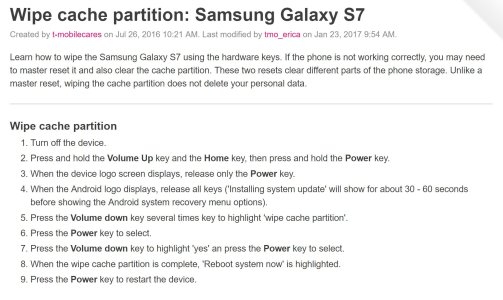
See attachment for instructions for wiping the cache partition. Just be careful as you're scrolling down the list of options to NOT select the Factory Reset option (I think it's just above the Wipe Cache option). And always good to make sure your phone is backed up prior to doing anything like this. Samsung Cloud, Google, Microsoft OneDrive ... whatever you choose. Can also connect phone by USB to backup to computer.

Good luck!!
 

Attachments

  • wipe cache partition on S7.JPG
    wipe cache partition on S7.JPG
    235.1 KB · Views: 33
See attachment for instructions for wiping the cache partition. Just be careful as you're scrolling down the list of options to NOT select the Factory Reset option (I think it's just above the Wipe Cache option). And always good to make sure your phone is backed up prior to doing anything like this. Samsung Cloud, Google, Microsoft OneDrive ... whatever you choose. Can also connect phone by USB to backup to computer.

Good luck!!
I am going to try that. Thank you!
 
Many other posts recommend the GSam Battery Monitor from the Play Store.

I agree. Download GSam Battery Monitor as it gives you more information. There you could see if your mobile network actually consumes a lot of power.
 
There is a good chance that it is not your cache. Nougat has battery life issues, the patch that came out the day after I received the nougat update broke my battery life, and multiple factory resets can't bring it back for me. Let me know if you have any luck.