Connected to public wifi but can't accept terms to access internet

  • Thread starter Thread starter Unreg
  • Start date Start date
U

Unreg

Note 10.1 2012: I use a public wifi for work. My Note sees and connects to the network but I don't get the "this network requires a sign in" pop-up. When I manually enter the terms acceptance IP I can click "accept" but then the browser hangs and eventually says it can't load the next screen (a second terms acceptance screen).

This happens in both the stock browser and chrome. I've tried forgetting the network and clearing the network cache. I have no issues connecting my Galaxy S3 or my windows laptop.

I'm at the end of my rope.
 
Welcome to Android Central! So when you connect and don't get that sign-in notification, are you saying that you're opening the browser? Are you able to see the sign-in page when you open the browser? What happens if you type in any URL, like Yahoo.com--does it go to Yahoo, or does it go to the wi-fi sign-in page? And if you try to sign in there, it's hanging? Sorry, I just want to clarify the sequence here.

See what happens if you go to the App Manager, select Chrome, and Clear Cache/Clear Data, then Force Stop. Now try connecting again.
 
Welcome to Android Central! So when you connect and don't get that sign-in notification, are you saying that you're opening the browser? Are you able to see the sign-in page when you open the browser? What happens if you type in any URL, like Yahoo.com--does it go to Yahoo, or does it go to the wi-fi sign-in page? And if you try to sign in there, it's hanging? Sorry, I just want to clarify the sequence here.

See what happens if you go to the App Manager, select Chrome, and Clear Cache/Clear Data, then Force Stop. Now try connecting again.

I'll write out the steps I take that work on my phone :

1) Enable wifi, see "connected to network."
2) On my S3, see a" This network requires sign in " notification. Click that notification, browser automatically opens to terms acceptance page.
3) Click accept, go to second acceptance page
4) click accept, Internet works.

On my Note step 2 never happens. If I manually enter the first acceptance page url I can click accept but the browser never gets anywhere. If I manually enter the second acceptance page url it also goes nowhere. I'm unable to access any page.

I tried clearing every cache I could think of.
 
Instead of manually entering the welcome page URL, what happens if you just enter any page, like Yahoo.com? It should automatically redirect to the welcome page. Does it still not work if you sign in there?
 
How long have you waited for the sign-in notification to appear? 10 seconds? 30 seconds? More than a minute?
 
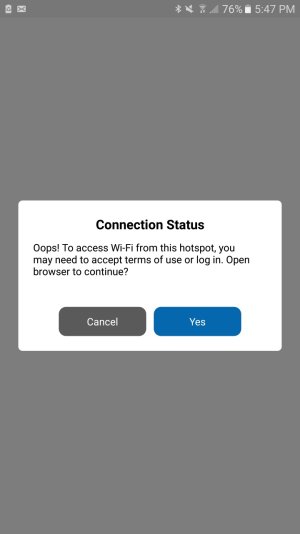
I am getting the same error on my Note5 while accessing home or public wifi. Attached is the image of the error pop up window and it goes nowhere.
 

Attachments

  • Screenshot_20170301-174733.jpg
    Screenshot_20170301-174733.jpg
    58.8 KB · Views: 2
Hello, I am getting a similar issue on my samsung J3. I can't seem to connect at a taco cabana. My older Kyocera has no problem. The issue is this.1.phone sees the said network. I click on the wifi for taco cabana, it "connects" to the point where it says you must click here to sign into the network and basically accept the term. Normally when you click to sign in it will open a browser page to accept terms,even if that didn't happen you can type in msn.com or any other url and it will redirect to the sign in, but that step never happens. It will either say network is not available, or if the browser tries to open up it will just hang until it finally pops up a message saying page cannot be reached.
I have occasionally been able to actually get the sign in agreement page to come up by fiddling with the settings like changing to static UP, but that's about as far as I get. It will pull up the agreement page, and then again hangs for a moment and then pops up the message unable to reach url. PLEASE!! Help me fix this issue. It's almost a necessity to get this issue fixed.
 
I have occasionally been able to actually get the sign in agreement page to come up by fiddling with the settings like changing to static IP

That's about the top of the list of bad ideas. Since you have absolutely no idea what the base IP of the wifi network is (10, 176 or 192) and no idea of which IPs are already assigned, you have about a one in over a million chance of success. That you've had success more than once means that you're one very lucky person.

it "connects" to the point where it says you must click here

That sure sounds like a "non-mobile" site. A half-decent mobile-format page would say "tap here" or "tap or click here". And, since mobile and non-mobile browsers work differently, that's probably one of the causes of the problem. Contact "taco cabana", what-or-whoever that is, and ask their tech support for help. (Have your phone on and your browser open, so you don't waste any more of their time than you have to if they want to watch the login to see what's happening.)
 
Thanks, yes I agree on getting lucky guessing the UP range, as far as contacting their "support" I have asked the manager,and even called their corporate hotline all they did was log the issue and said they would send it up the chain, that was about the time I posted here,and still no reply,and still unable to connect.
 

Trending Posts

Forum statistics

Threads
960,346
Messages
6,982,085
Members
3,164,488
Latest member
CrazyParis