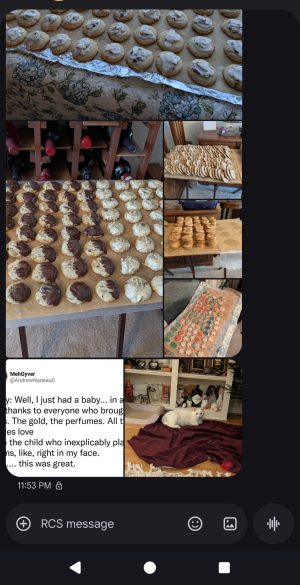
Google Messages app texts now grouping pics in grid format rather than stacking them - how can I change this?

Android Dude777

Active member
Mar 20, 2024
44
11
8
When people send multiple pics in a single text, the pics are now grouped visually in a grid rather than stacked one on top of another, the way they used to be (this just started recently). How can I change this back to the previous way of displaying them? Thanks.
 
  • Like
Reactions: Gremlin69
Hi
Can you show a screenshot of this ? Just block personal information
 
Looking at your screenshot the images appear to be ones you received, does this also happen to images you send?

How many images before it changes to this style? I've attaching a bunch of pics and mine are all single pics in a row like you described from before. Does this happen with 4 pics or only after 6, is there a point where it still acts the same as you remember and after that it switches to this?

Because it looks like these are images that you received does the sender make a difference? Is there anything you can think of that might tie this effect to specific senders? Only happens to my iPhone friends, only happens to people I'm not in group conversations with?

Do you get the same effect when you are the sender?

What phone do you have?

The difficulty here is the app is working. We should assume that if it is working there is nothing wrong so there's probably nothing to fix. If you've gone through the settings and haven't found one to change this behavior, it was probably done intentionally. I see where it could be a benefit, taking up less space and making pics easier to view with less scrolling, but based on your account this is likely the result of an app update. I looked at mine and I can no longer find the "uninstall updates" option that we used to have for pre-installed apps or I'd say uninstall the updates and see if the behavior returns to normal. Barring that my next piece of advice would be to contact the developer. Ask for a fix or work around and see if they have any advice to offer, because I doubt we'll be able to fix something that isn't broken. Only they can do that.
 
my meager contribution: I received a text from my daughter (iPhone) as part of a group chat with pics and short videos of the grandsquirts and mine looked just like the above. however, when I clicked on it, there was an iCloud link to download the pics. so, perhaps, the "grid" is nothing more than a thumbnail preview.
 
my meager contribution: I received a text from my daughter (iPhone) as part of a group chat with pics and short videos of the grandsquirts and mine looked just like the above. however, when I clicked on it, there was an iCloud link to download the pics. so, perhaps, the "grid" is nothing more than a thumbnail preview.
I think telegram does this with multiple photos u send also.
 
I just did a test and send myself some wallpapers from my iPhone to Fold and they show on top of each other when I was in the message and then goes grid when I went out of message and back in, it did the same with outgoing
70cecc38dcbb3e604e321507dcdfbae8.jpg
8ecee68653ce4ab0d7e9bdc31a05b5d5.jpg
142955015e7bd86f02a19e2fe634ff00.jpg
c8de8742fdde698b1a7c72109d66a2ad.jpg
 
Last edited:
  • Like
Reactions: Laura Knotek
That sounds like it's limiting the scroll, going left to right vs up and down.

Given there doesn't appear to be an actual setting for this, and if it's happening to everyone it isn't a bug, so for those who are bothered by this, reaching out to the developer is your best course of action.

Send your comments here, apps-help@google.com, and be sure to name the app since this appears to be a general email address and not specific to any one of their products.
 
  • Like
Reactions: Laura Knotek

Trending Posts

Forum statistics

Threads
960,066
Messages
6,981,004
Members
3,164,373
Latest member
luigui443