Pop up request - Android update 3.10.40-ge42477w

  • Thread starter Thread starter AC Question
  • Start date Start date
A

AC Question

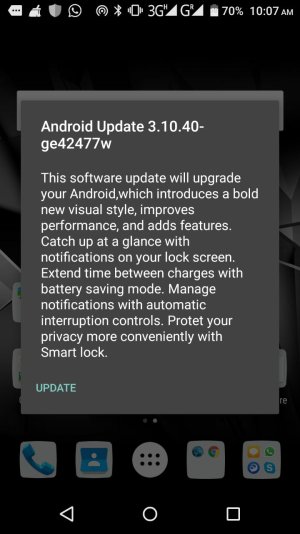
My Note 4 pops up the message, Android Update 3.10.40-ge42477w and wants me to update. Is it safe to update? When the popup is displayed, it disables all functionalities on the phone and the only way i can temporarily get rid of it is to reboot my phone. This popup comes up at 3-5mins intervals.
Please advise if i can proceed with the update. If not, how can i permanently get rid of the popup?
 
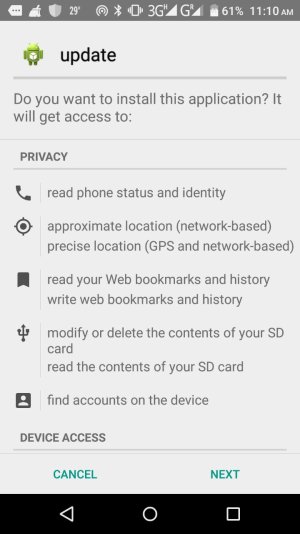
I get exactly same message on my Micromax E484 phone w/ Lollipop. This was independent of the genuine micromax OS update request - which I did recently. Temporarily, I get out of the screen by clicking UPDATE and CANCEL in next screen. Keeps popping up every now and then. Kinda bothersome! But, would like to know if this is safe to install and who is the publisher? I noticed some spelling errors which forces me to think if this is genuine at all. But, even with CM Security installed, do not know how to get rid of this if not required. Please suggest. Screenshot attached.Android Update Pop-up.jpeg
 
One more image...
Android Update Pop-Up2.jpeg

Pls suggest if this is safe to install or how to get rid of. Doesn't seem to be from Google. I have a kernel version: 3.10.72; build number: MMX_E484_SW_V19_HW_V1.0.0_23082016; Custom Build Version: ALPS.L1.MP2.V1.29_LCSH6795.LW.HZ.L1_P111. If this info helps. Android version is - Lollipop (5.1).
 
Thank you for the screenshots. Like you, I judge the message to be fraudulent. Try Safe Mode to test whether a third-party app is the cause.

Keep us posted, and welcome as a new member. :)

Sent from mTalk
 
Thank you.

But, how do I get to safe mode? Can you pls guide me? I haven't used that option so far. Looks like the UPDATE popup also stopped, haven't noticed for the past 2 days.

Never mind, found that option. Will try next time if I get the pop up.
 
Have the same too.This caused by an app.I think this must been Hummingbad or Android Marcher.But i got a solution for this.Just follow the steps.
1.Find a folder named "database"
2.You'll see few files with one .apk file BUT DO NOT INSTALL IT.
3.Open all files execpt the .apk ones as a text file
4.In one file,you will see a name of one of your installed app,but something like com.xxx.xxx.xxx
5.If you know that app name and you know you installed it,UNINSTALL IT NOW.
6.That "database" folder should gone.But if not,delete it.Yeah,permanently delete it,not to the recycle bin.
7.Voila! That notification wil gone FOREVER.
Don't believe me? Just restart the phone after you do it.
Mine is caused by slither.io
 
Eu também sofro deste falso Android Update
Inicialmente clicava em update e na página seguinte cancelava.
Como ele reaparece mais que quatro vezes à hora resolvi instalá-lo e logo fui advertido pelo CM security que não era seguro instalar mas segui.
Finalmente corri um scan com o CM Security que nada detectou.
Desinstalei-o e instalei o Kaspersky ®‎ que o identificou como vírus e ordenei que o removesse.
A verdade é que ele me volta a aparecer sempre do mesmo modo.
Entretanto, paralelamente e quem sabe correspondentemente entre os tempos abaixo indicados recebi as seguintes sms por doze vezes cuja emissão a Vodafone recusa assumir a responsabilidade
21.10.2016 11:53
20.10.2016 13:27
Vodafone:Bloqueamos um download a 20.10.2016 15:40 porque o ficheiro foi considerado inseguro http://u.smartchoiceads.com/sdk/PushSdkJewel-v2_20160804153647.apk. Para continuar, desative o antivirus e tente novamente.
14:40
 
Have the same too.This caused by an app.I think this must been Hummingbad or Android Marcher.But i got a solution for this.Just follow the steps.
1.Find a folder named "database"
2.You'll see few files with one .apk file BUT DO NOT INSTALL IT.
3.Open all files execpt the .apk ones as a text file
4.In one file,you will see a name of one of your installed app,but something like com.xxx.xxx.xxx
5.If you know that app name and you know you installed it,UNINSTALL IT NOW.
6.That "database" folder should gone.But if not,delete it.Yeah,permanently delete it,not to the recycle bin.
7.Voila! That notification wil gone FOREVER.
Don't believe me? Just restart the phone after you do it.
Mine is caused by slither.io


How do you open the files as text file? It doesnt gove me any options and only states that "Unable to find application to perform this action"
 
I installed it and it puts ads on your screen every couple of minute. The only way I could uninstall it was to wait for my phone to say that it was malicious and ask to uninstall it. After you uninstall it, it may still ask you to install the update.
 
Rename the name of the files by putting .txt extension
For example:- install --> install.txt (Make sure you rename all the files except update)
You should be able to see the text now and make sure you unninstall that app which is written in one of the texts and delete the database folder if it didn't delete when you unninstalled the app.Now the update prompt should be gone.
 

Trending Posts

Forum statistics

Threads
959,766
Messages
6,980,138
Members
3,164,300
Latest member
Gremlin69