Turn off repeat notifications?

Milehigh

Active member
Feb 15, 2011
32
1
0
Somewhere along the line, I turned on repeat notifications and realized I don't like that. Thought it would be helpful but it really is irritating. Anyone know where that setting is so it can be turned off? Thanks :)
 
Somewhere along the line, I turned on repeat notifications and realized I don't like that. Thought it would be helpful but it really is irritating. Anyone know where that setting is so it can be turned off? Thanks :)

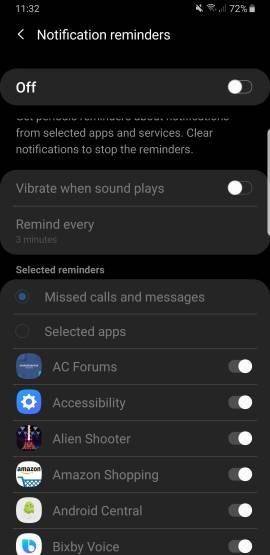
You can go into "Settings"-> "Notifications". Scroll all the way down until you see "Looking for Something Else" and click on "Notification Reminder".

That is the easiest way I find it.
 
Somewhere along the line, I turned on repeat notifications and realized I don't like that. Thought it would be helpful but it really is irritating. Anyone know where that setting is so it can be turned off? Thanks :)

Yeah like the other poster said , type in settings search bar notifications reminder and turn off
 

Attachments

  • 1506.jpg
    1506.jpg
    16.4 KB · Views: 30
Thanks all, I saw that screen and mistaken thought it would turn off ALL notifications, not the reoccurring reminders. All fixed now, I hate when something is right in front of you, but you can't see the forest for the trees. You sure have to read these screens carefully, so many options.